First Off, What is OT Networking?
Before diving into acronyms, it’s important to understand the landscape. Operational Technology (OT) refers to the hardware and software used to monitor and control physical devices—like your building’s HVAC, lighting, and security systems.
Unlike IT networks which move data (emails, files), OT networks move commands that change the physical world. For decades, these networks were isolated. Today, they are converging with standard IT networks, which means understanding the protocols below is more critical than ever for keeping your building running and secure.
BACnet, short for Building Automation and Control Network, is the global standard communication protocol for building automation. Think of it as a universal language that allows equipment from different manufacturers (like a Siemens chiller and a Delta Controls thermostat) to talk to each other seamlessly.
This open standard eliminates “vendor lock-in,” making it easier for facility managers to integrate systems, improve efficiency, and reduce operational headaches.
But BACnet is just the language. To speak it, devices need a medium—like a serial or Ethernet cable. That is where BACnet/IP and MS/TP come in (with a little BACnet/SC for reference!).
| Feature | BACnet/IP | BACnet MS/TP | BACnet/SC (New) |
|---|---|---|---|
| What is it? | The high-speed "highway" of your building. | The legacy "local roads" for smaller devices. | The secure, encrypted version of BACnet/IP. |
| Cabling | Ethernet cables (Cat5/6) or Fiber. | Twisted Pair Copper (RS-485). | Uses existing IT networks (HTTPS/TLS). |
| Speed | Very Fast (100 Mbps – 1 Gbps+) |
Slow (9.6 kbps – 76.8 kbps) |
Fast & Secure |
| Best For | Connecting major controllers and buildings. | Older thermostats & sensors (Legacy). | Critical infrastructure & secure IT convergence. |
The key difference between them lies in how they transmit data and their use cases:
- BACnet over Ethernet uses… Ethernet as the physical layer for communication. Devices on the same Ethernet network can communicate directly, but this method is mostly used for local networks and doesn’t handle routing between different networks well.
- BACnet/IP is the more flexible version, using standard IP protocols (like the ones used for the internet) to communicate across different networks, including both local and wide area networks. It’s great for larger setups where devices may be spread across multiple locations because it supports routing.
- BACnet MS/TP is a slower, older method that uses twisted-pair cabling (like RS-485). It’s typically used for smaller networks, such as connecting field devices like sensors or thermostats, because it’s more cost-effective for low-speed communications but doesn’t scale as easily as IP-based options.
1. BACnet MS/TP
This is the “classic” method found in most older buildings. It connects field devices (like VAV boxes and thermostats) in a daisy-chain using twisted-pair copper wire.
- Pros: Cheap wiring, long distance capability.
- Cons: Slow, hard to troubleshoot, and prone to wiring faults. One bad device can crash the whole chain.
- Trend: The industry is moving away from MS/TP toward “IP to the Edge,” where even small devices use BACnet/IP for better speed and reliability.
2. BACnet/IP
BACnet/IP wraps BACnet messages inside standard internet packets (UDP). This allows devices to communicate over standard IP networks and (with BBMDs—Broadcast Management Devices) across subnets, making it ideal for connecting multiple networks and subnets across floors or buildings.
- Pros: Fast, uses standard IT gear.
- Cons: More complex to route across subnets (requires BBMDs). Standard BACnet/IP is unencrypted, meaning anyone on the network can read the data, or tunnel through unprotected sections of your network via unsecured OT networks.

How Many Issues Will You Solve Today?
Is BACnet The Same as Ethernet?
Not quite. “Ethernet” refers to the physical cables and switches (Layer 1 & 2), while “IP” is the address system (Layer 3) that helps data find its destination. BACnet Ethernet (ISO 8802-3): An older method where devices communicated using only MAC addresses. You rarely see this in new setups.
BACnet/IP: The modern standard. It uses IP addresses, making it “routable” across the internet and large campus networks.
The takeaway: If you are installing a new system today, you are almost certainly using BACnet/IP, not raw BACnet Ethernet.
Common Issues & Troubleshooting
New to OT networking? Here are the most common problems you will face:
- Duplicate Addresses:
- MS/TP: Two devices with the same MAC address (e.g., “05”) will cause the token to drop, knocking devices offline.
- IP: Two devices with the same IP address will cause intermittent communication failures.
- BBMD Misconfiguration: If your BACnet/IP devices works fine within a room but can’t talk to the main server across the campus, your BBMD (Broadcast Management Device) tables are likely missing or incorrect.
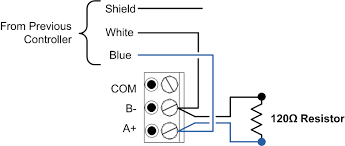
- Wiring Faults (MS/TP): A single loose wire, reversed polarity, or missing “termination resistor” on an MS/TP chain can bring down the entire network segment.
We have a wealth of posts diving into common issues on MS/TP and BACnet/IP, and how to deal with them fast through OptigoVN. Take a browse through our archive here.
Need Visibility into Your OT Network?
Whether you are managing legacy MS/TP chains or rolling out a new BACnet/IP deployment across campus, you can’t fix what you can’t see.
OptigoVN and Site Scope+ provide deep insights into your OT network health, helping you pinpoint duplicate addresses, overloaded networks, and wiring faults instantly.
Ready to stop guessing?